Building Web Applications with XML Databases
Thursday 12th November 2026
XQuery, Elemental, and the Web (XRX)
Working with Collections
Producing dynamic HTML Web Pages with XQuery
A zero-translation architecture
Originally, XRX = XForms, REST, and XQuery
Now typically:
XML as the storage
XQuery (and XSLT) as the backend processing
Maybe some XML Templating Framework (XQuery/XSLT)
Delivering XML/HTML/JSON over REST
JavaScript on the client. Web-browser / API client.
Representational State Transfer; see Wikipedia - REST
Simply put:
A way to send data backward and forward over HTTP
Address resources through URI that are built as paths, e.g.: /company/<evolvedbinary>/employee/<adamretter>
HTTP verbs for actions: GET,PUT, POST, DELETE, etc.
The server is stateless; clients maintain user/app state
Hypertext (or equiv.) used for the content; describe next/previous/related URI links
Output – W3C XSLT and XQuery Serialization 3.1
XML / XHTML / HTML 5 / Text / JSON
                  declare namespace output = "http://www.w3.org/2010/xslt-xquery-serialization";

                  declare option output:method "xhtml";
                  declare option output:version "1.0";
                  declare option output:media-type "application/xhtml+xml";
                  declare namespace output = "http://www.w3.org/2010/xslt-xquery-serialization";

                  declare option output:method "html";
                  declare option output:version "5";
                  declare option output:media-type "text/html";
Standard XQuery by default has no awareness of the Web
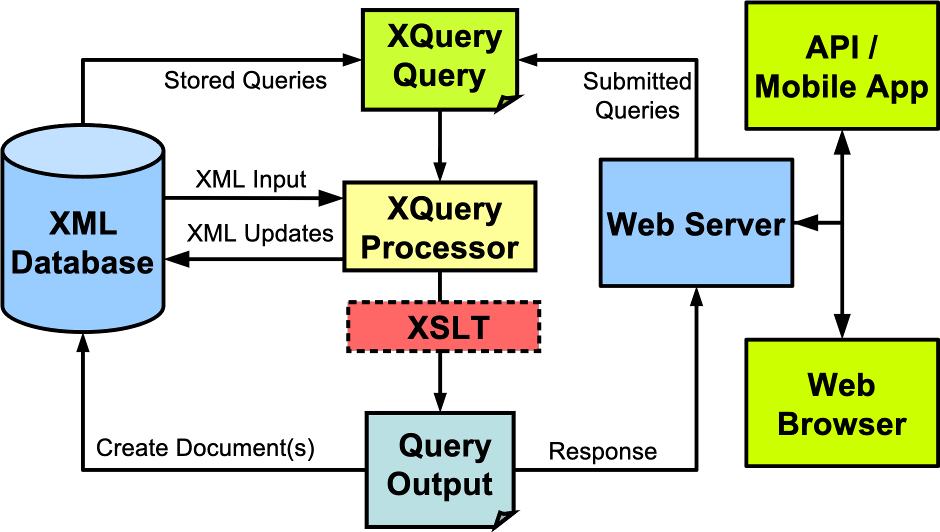
Some NXDB, such as Elemental, couple an XML Database with a Web Server:
We need more data to work with... so, we will store a collection of XML files!
Find the file hindawi-small.zip in the provided Exercises folder at: Exercises/samples/hindawi-small.zip
From the File Menu in eXide, enter the DB Manager:
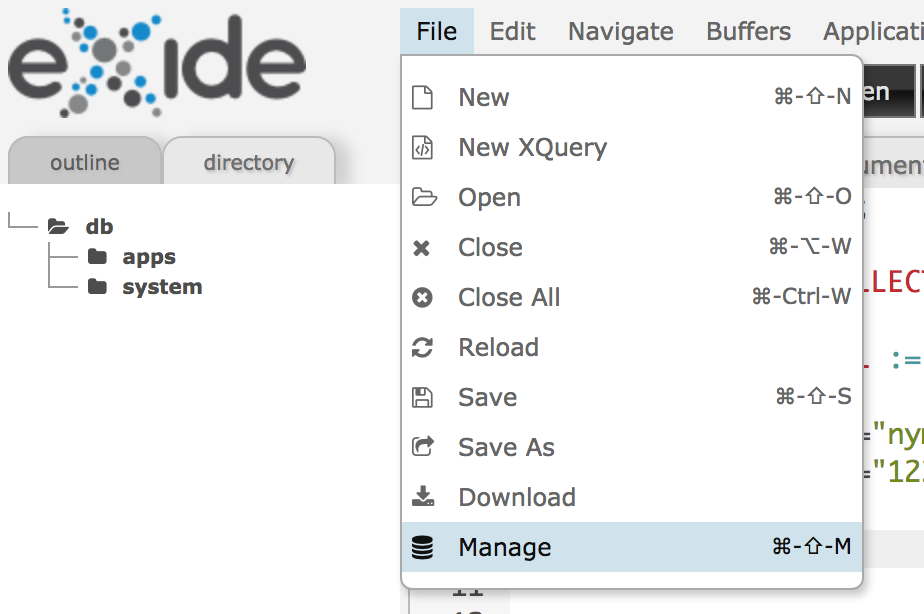
In eXide:
hindawi-small.zip file from your Computer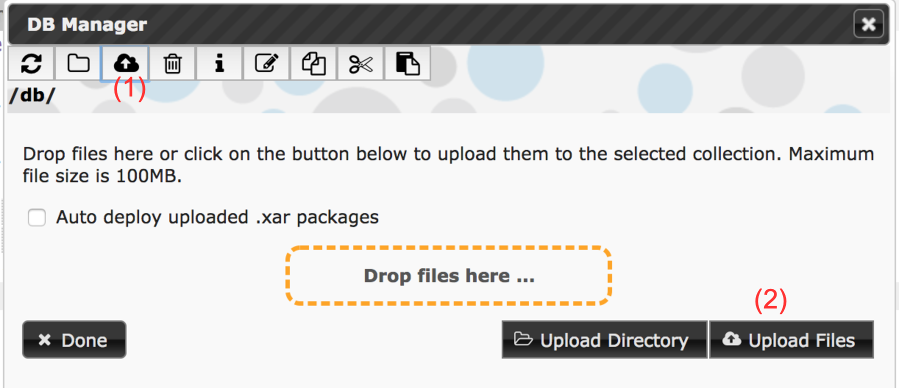
         let $collection-uri := xmldb:create-collection("/db", "hindawi-data")
         let $zip := util:binary-doc("/db/hindawi-small.zip")
         return
            compression:unzip($zip, compression:no-filter#3, (), function($path as xs:string, $dt as xs:string, $px as item()*) as xs:anyURI {
                  xs:anyURI($collection-uri || "/" || $path)
            }, ())
xmldb:create-collection, util:binary-doc, and compression:unzipBoth the fn:doc() and fn:collection() functions take a URI
fn:doc returns zero-or-one document node
fn:collection returns zero-or-many nodes
The URI may, or may not, be de-referenced
In Elemental, both functions return document node(s).
Q: What is a Collection?
Implementation defined
A folder? Hierarchical?
URI! A label?
Using eXide, write an XQuery:
Query the collection: /db/hindawi-data
Produce an XML report:
         <articles>
            <article year="2014" title="Understanding the Colour of Jake the Dog">
               <authors>
                  <author surname="The Human" given-names="Finn"/>
               </authors>
            </article>
            <article year="2014" title="Methods for the Hypnotisation of Princesses">
               <authors>
                  <author surname="Ice King" given-names="The"/>
               </authors>
            </article>
         </articles>
Hint: You might want to look into fn:subsequence
         <articles>
         {
            let $articles := subsequence(collection("/db/hindawi-data"), 1, 10)/article
            for $article in $articles
            let $authors := $article//contrib-group/contrib[ @contrib-type eq "author"]/name
            let $year := $article//pub-date[@pub-type eq "publication-year"]/year
            order by $year cast as xs:integer descending
            return
               <article year="{$year}" title="{$article//article-meta//article-title}">
                  <authors>
                    { $authors ! <author surname="{surname}" given-names="{given-names}"/> }
                  </authors>
               </article>
         }
         </articles>
You can store your XQuery into Elemental
Once the query is stored in the database you can do some cool stuff with the Web!
In eXide:
/db/apps collectionhindawi, and click Ok.hindawi sub-collectionlist.xq, click Save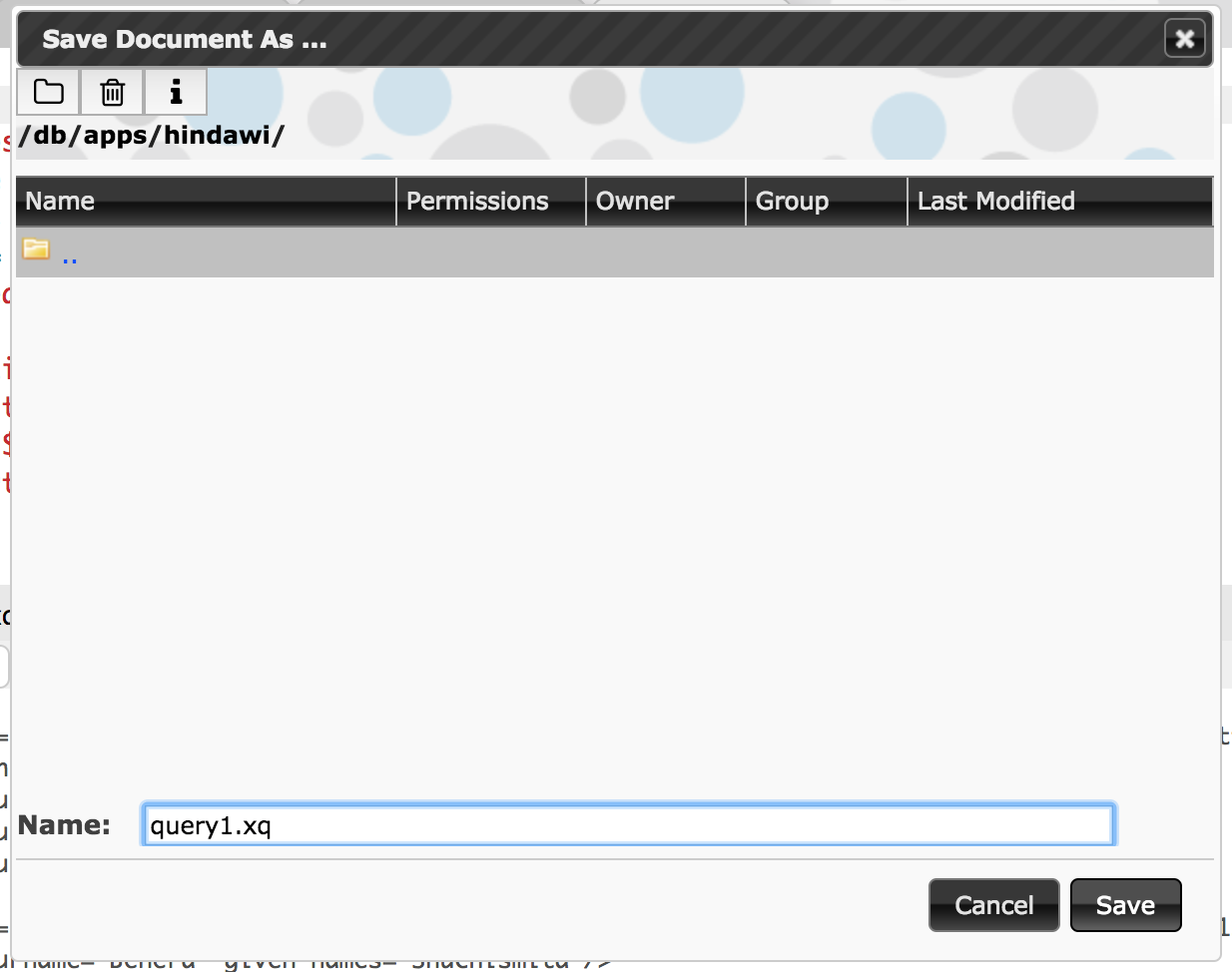
Your query should now be present in the database at /db/apps/hindawi/list.xq
Your XQuery is a binary document stored at the database path: /db/apps/hindaw/list.xq
We will use Elemental's REST Server to execute the query
REST Server URI's have the prefix: /exist/rest
The URI scheme is: http://<hostname>:<port>/exist/rest/<database path>
In your web-browser, visit the URL:
Using eXide, modify your XQuery list.xq to produce HTML. You should:
Output HTML instead of XML
Produce suitable HTML tags instead of XML elements
              <table>
                <tr>
                  <th>Year</th>
                  <th>Title</th>
                  <th>Authors</th>
                </tr>
                <tr>
                  <td>2014</td>
                  <td>Understanding the Colour of Jake the Dog</td>
                  <td>
                    <ul>
                      <li>Finn The Human</li>
                    </ul>
                  </td>
                </tr>
              </table>
Test it in your Web Browser!
Consider what you have learnt about the W3C W3C XSLT and XQuery Serialization 3.1 spec.
         declare namespace output="http://www.w3.org/2010/xslt-xquery-serialization";

         declare option output:method "html";
         declare option output:version "5";
         declare option output:media-type "text/html";

         <html>
            <h1>Journal Articles</h1>
            <table border="1">
               <tr>
                  <th>Year</th>
                  <th>Title</th>
                  <th>Authors</th>
               </tr>
               {
                  let $articles := subsequence(
                     for $article in collection("/db/hindawi-data")/article
                     order by
                         $article//pub-date[@pub-type eq "publication-year"]/year
                         cast as xs:integer descending
                     return $article
                  , 1, 10)
                  return
                     for $article in $articles
                     let $authors := $article//contrib-group/contrib[@contrib-type eq "author"]/name
                     return
                        <tr>
                           <td>{$article//pub-date[ @pub-type eq "publication-year"]/year/text()}</td>
                           <td>{$article//article-meta//article-title/text()}</td>
                           <td>
                              <ul>
                                 { $authors ! <li>{string-join((surname, given-names), " ")}</li> }
                              </ul>
                           </td>
                        </tr>
               }
            </table>
         </html>
XRX
XQuery Procesor Model
Binary Documents – util:binary-doc
Uncompressing Zip files - compression:unzip
Working with Collections
Executing a server-side XQuery from the Web Browser
Serialization of XML to HTML – output:method "html"
Generating a dynamic HTML page from XQuery
URL Rewriting
Elemental's Request and Response Modules
Processing a HTML form with XQuery
URLs that make perfect sense for a REST API or development aren't always well suited for end users!
Wouldn't the following URL:
.../exist/rest/db/apps/hindawi/list.xq
be better if it could be accessed by the user as:
www.hindawi.com/journal
?
Elemental offers a few different ways of configuring user friendly URLs and URL interfaces:
controller.xq that controls how URLs are redirectedIn production systems, it is also quite common to install a HTTP Reverse Proxy in-front of Elemental to handle URI rewriting; see Production use - Proxying behind a Web Server.
Elemental's REST API provides the URI shortcut /exist/apps for the database collection /db/apps
http://localhost:8080/exist/rest/db/apps/hindawi/list.xq,http://localhost:8080/exist/apps/hindawi/list.xqElemental upon receiving a HTTP request accessing the database via a URL path starting
/exist/apps/:
controller.xq file (an XQuery)/db)controller.xq file that it findscontroller.xq is provided with details about the HTTP requestcontroller.xq should return an XML document instructing Elemental on how to process the requestWhen your controller.xq is executed, a number of variables describing the HTTP request URI are available
for you to use.
For example with the URI path /exist/apps/hindawi/list.xq::
$exist:root |
The root of the current controller hierarchy. This may either point to the file system or to a collection in the database. Use this variable to locate resources relative to the root of the application. | e.g.: xmldb:exist:/db/apps |
$exist:resource |
The section of the URI after the last /, usually pointing to a resource or collection |
e.g.: list.xq |
$exist:controller |
The part of the URI leading to the current controller script. | e.g.: /hindawi |
$exist:path |
The last part of the request URI after the section leading to the controller | e.g.: /list.xq |
$exist:prefix |
(Optional) Any prefix mapping of the current controller hierarchy | e.g.: /apps |
In addition to the provided variables, you can also call the Request Module to get data from the HTTP request
The controller.xq should return an XML document instructing Elemental how to process the request
The result document typically has a document element named dispatch
The dispatch element must be in the exist namespace (http://exist.sourceforge.net/NS/exist)
Within the dispatch, we can describe:
Documentation of Elemental's Controller XML Format
If you want to bypass the controller script entirely, you can return the ignore element instead of a dispatch:
<ignore xmlns="http://exist.sourceforge.net/NS/exist"/>
This can be useful for requests for static resources (such as images, CSS, etc), or for where you are using the controller alongside another method for re-writing URLs.
cache-control OptionThe cache-control element may be used in either dispatch or ignore, and configures whether or not the current URL rewrite should be cached.
It has a single attribute cache, which must be set to either "yes" or "no".
      <dispatch xmlns="http://exist.sourceforge.net/NS/exist">
        <redirect url="..."/>
        <cache-control cache="yes"/>
      </dispatch>
Only the URL rewrite rule is cached, not the HTTP response.
To map the following URL path:
/exist/apps/mycompany/department/digital/employee/fredsmith
to the XQuery:
/exist/rest/db/apps/mycompany/employee-details.xq?dept=digital&name=fredsmith
The /db/apps/mycompany/controller.xq could look like:
      xquery version "3.1";

      declare variable $exist:path external;

      if (matches($exist:path, "^/department/[^/]+/employee/[^/]+$"))
      then
        let $department := replace($exist:path, "/department/([^/]+)/employee/[^/]+", "$1")
        let $employee := replace($exist:path, "/department/[^/]+/employee/([^/]+)", "$1")
        return

          <dispatch xmlns="http://exist.sourceforge.net/NS/exist">
            <forward url="employee-details.xq">
              <add-parameter name="dept" value="{$department}"/>
              <add-parameter name="name" value="{$employee}"/>
            </forward>
          </dispatch>
      else
        <ignore xmlns="http://exist.sourceforge.net/NS/exist"/>
Remember you have the full-power of XQuery available, and so you can do very complex URL rewriting if needed
Usign eXide, write and store a controller.xq into the database, so that:
Accessing the URL path /exist/apps/hindawi/journal shows the results from executing your /db/apps/hindawi/list.xq XQuery
Make sure to test this with your Web-browser!
Your controller.xq should be stored at /db/apps/hindawi/controller.xq:
          xquery version "3.1";

declare variable $exist:path external;

if ($exist:path eq "/journal")
then
    <dispatch xmlns="http://exist.sourceforge.net/NS/exist">
      <forward url="list.xq"/>
    </dispatch>
else
    <ignore xmlns="http://exist.sourceforge.net/NS/exist"/>
If you visit http://localhost:8080/exist/rest/apps/hindawi you get a database collection listing
Modify your controller.xq to show something better there
Bonus points if you also cope with http://localhost:8080/exist/rest/apps/hindawi/
Make sure to test this with your Web-browser!
Your controller.xq should be stored at /db/apps/hindawi/controller.xq:
            xquery version "3.1";

  declare variable $exist:path external;

  if ($exist:path = ("", "/"))
  then
    <h1>Welcome to hindawi</h1>
  else if ($exist:path eq "/journal")
  then
      <dispatch xmlns="http://exist.sourceforge.net/NS/exist">
        <forward url="list.xq"/>
      </dispatch>
  else
      <ignore xmlns="http://exist.sourceforge.net/NS/exist"/>
Elemental specific XQuery Module for working with HTTP Requests
A HTTP Request is the information sent by your Web-Browser (or app.) to the Web Server (e.g. Elemental)
Describes a single resource to retrieve/create/update/delete
Opening a Web Page may require many HTTP Requests; one for each resource that makes up the page
Provides a set of XQuery functions
Reads data from Java’s HttpServletRequest object
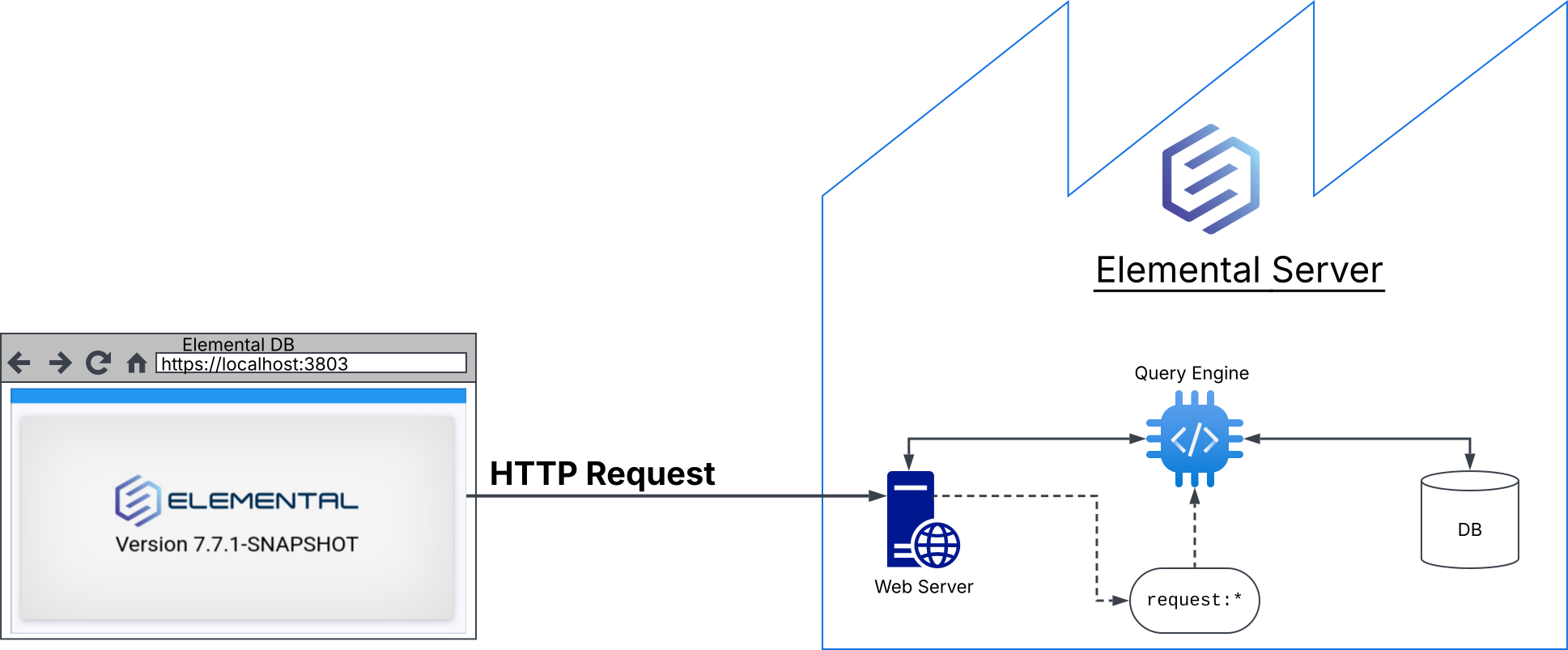
Namespace: http://exist-db.org/xquery/request
Prefix: request
request:get-parameter |
Get the value of a HTTP Query or Form parameter |
request:get-parameter-names |
Get the names of all available HTTP Query or Form parameters |
request:get-data |
Get the content of a file sent (PUT/POST) to the server in the body of the request |
request:get-uploaded-file |
Get the content of a file sent (POST) from an HTML form to the server |
request:get-uploaded-file-name |
Get the filename of a file sent (POST) from an HTML form to the server |
Given the URI:
http://localhost:8080/exist/rest/db/myquery.xq?abbrev=xmlss&year=2019Get the value of the abbrev HTTP Query parameter:
request:get-parameter("abbrev", ())
Get the name and value of all parameters:
request:get-parameter-names() ! <param name="{.}" value="{request:get-parameter(., ())}"/>
Elemental specific XQuery Module for working with HTTP Response
A HTTP Response is the information sent by a Web Server (e.g. Elemental) to your Web-Browser (or app.)
Contains a single resource
Each HTTP Request, generates one HTTP Response
Provides a set of XQuery functions
Writes data to Java’s HttpServletResponse object
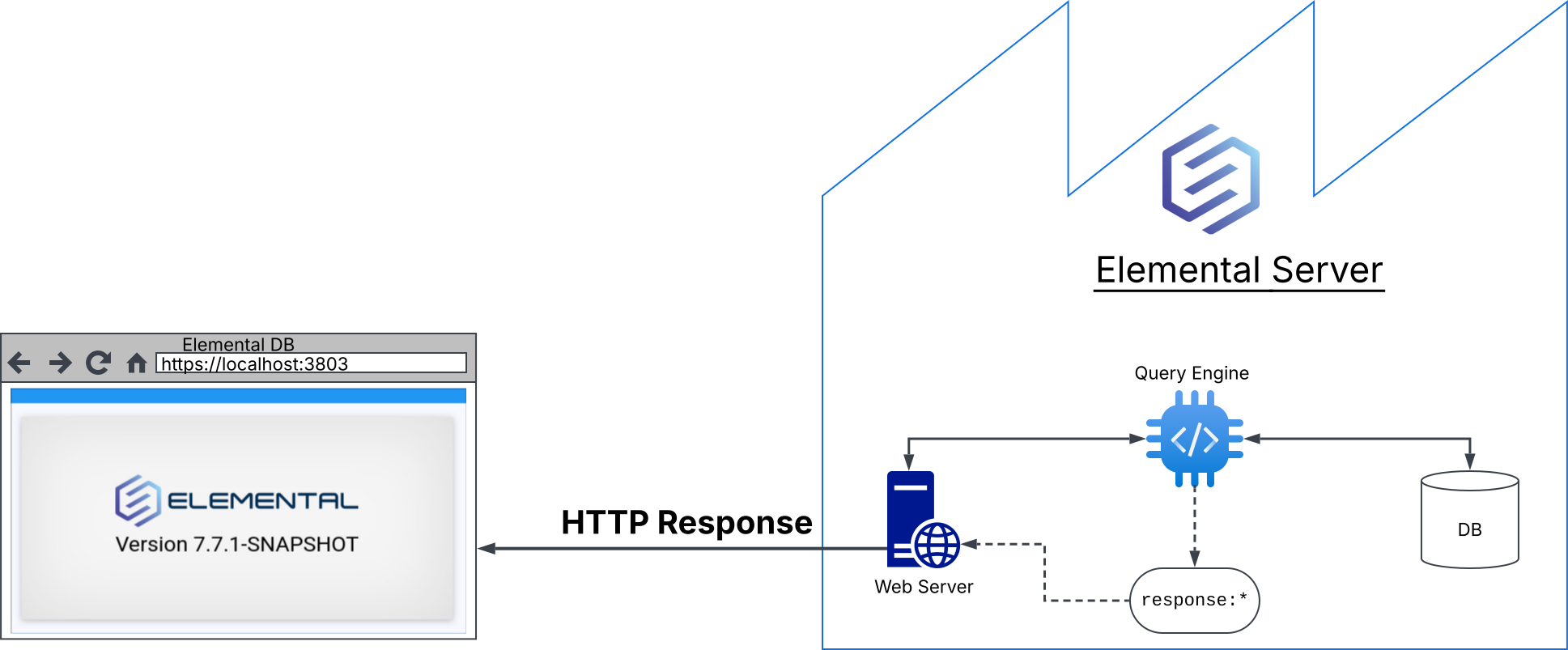
Namespace: http://exist-db.org/xquery/response
Prefix: response
response:set-status-code |
Set the value of the status code in the HTTP Response |
response:redirect-to |
Redirect the client (e.g. web-browser) to a new location |
response:stream-binary |
Stream binary data (e.g. a binary document from the database) to the HTTP response and commit the response. |
Details of HTTP response codes
response:set-status-code(404)
response:redirect-to("https://theoatmeal.com/")
            let $cats-picture := util:binary-doc("/db/images/cats.jpg")
            return
              response:stream-binary($cats-picture, "image/jpeg", "cats.jpg")
Using eXide, modify your list.xq query:
Add an HTML form at the top of the produced HTML page
See: W3Schools HTML Forms
The form should have a single year field
When the form is submitted it should POST its fields as parameters to your list.xq query
You should modify your list.xq to only return the first 10 results for the year received from the form.
The start of our list.xq query should now look like:
      <html>
        <h1>Journal Articles</h1>
        <form action="list.xq" method="post">
          <label for="year">Year:</label>
          <input name="year" id="year" value="{request:get-parameter('year',())}"/>
          <input type="submit"/>
        </form>
        <hr/>
        <table border="1"> ...</table>
      </html>
The For Clause from our previous inner FLWOR expression should now look like:
      for $article in collection("/db/hindawi-data")/article
      let $year := $article//pub-date[@pub-type eq "publication-year"]/year
      where $year eq request:get-parameter("year", ())
      order by $year
      cast as xs:integer descending
      return
        $article
We can use XPath to query the structure of a document.
We can use Full Text queries to query the content of the document.
Combining structural and content queries together is incredibly powerful!
XQuery and XPath Full Text 3.0
W3C Spec.
Some implement, some don’t!
BaseX does
Marklogic, and Elemental have something else...
Define indexes for your Collection(s)
This is done in XML
Stored in a file named collection.xconf in the system Collection.
If your collection is: /db/abc, then your collection.xconf must be located at: /db/system/config/db/abc/collection.xconf
Reindex your Collection
Write full-text queries using the ft:query function(s)
Other index types are available: NGram, Range, QName, Sort, Algolia, and Geospatial.
Using eXide, store the following XML file to: /db/system/config/db/hindawi-data/collection.xconf:
eXide should ask you if you want to apply the Configuration, choose yes.
If not – ask me!
      <collection>
        <index>
          <lucene>
            <analyzer class="org.apache.lucene.analysis.standard.StandardAnalyzer"/>
            <text qname="article-title" boost="2.0"/>
            <text qname="p">
              <inline qname="sup"/>
              <inline qname="sub"/>
            </text>
          </lucene>
        </index>
      </collection>
Using eXide, modify your list.xq query:
Add an additional field to your HTML form called keywords
When your list.xq query detects the keywords field, it should restrict the results to the first 10 which match the keyword in the article abstract.
You will need to use Elemental's ft:query function inside a predicate on the abstract of the article.
Elemental's Full Text Index documentation is here.
The end of our HTML form of our list.xq query:
      <form>
        ...
        <label for="keywords">Keywords:</label>
        <input name="keywords" id="keywords" value="{request:get-parameter('keywords', ())}"/>
        <input type="submit"/>
      </form>
Our initial FLWOR becomes:
      for $article in
        if(request:get-parameter("keywords", ()))
        then
          collection("/db/hindawi-data")/article[.//abstract[ft:query(p, request:get-parameter("keywords", ()))]]
        else
           collection("/db/hindawi-data")/article
      let $year := ...